Provisioning a simple Git repository with Terraform
I’ve used Terraform to provision a Git repository on a t3.small EC2 instance to push my projects.
Published on: · Last updated: · 8 min read
Why this project #
To practically and versionably establish my own remote repository to push my projects and related things. I used Git as version control, Nginx as the server, and Terraform as infrastructure-as-code, thus configuring the environment on an AWS EC2 t3.small instance with 2GB, without the need for extra storage.
Project objectives #
- Provision AWS infrastructure declaratively with Terraform;
- Create an EC2 Ubuntu instance to host a Git server;
- Allow Git operations only via SSH (clone, push, pull);
- Provide a web interface for repository visualization with GitWeb;
- Expose GitWeb exclusively via CloudFront (HTTPS);
- Restrict the instance’s HTTP access to CloudFront only;
- Keep the environment simple, without ALB, WAF, or additional services.
Architecture overview #
The final architecture consists of a few elements, but they are well defined:
EC2 (Ubuntu 22.04)
Responsible for:- Git (bare repositories)
- GitWeb
- Nginx
- fcgiwrap
CloudFront Acts as the secure exposure layer:
- HTTPS for the public
- Origin restricted to the EC2 instance
- No direct HTTP access to the instance
Network (default VPC)
- Public subnet
- Internet Gateway
- Explicit route table
Git repository in production #
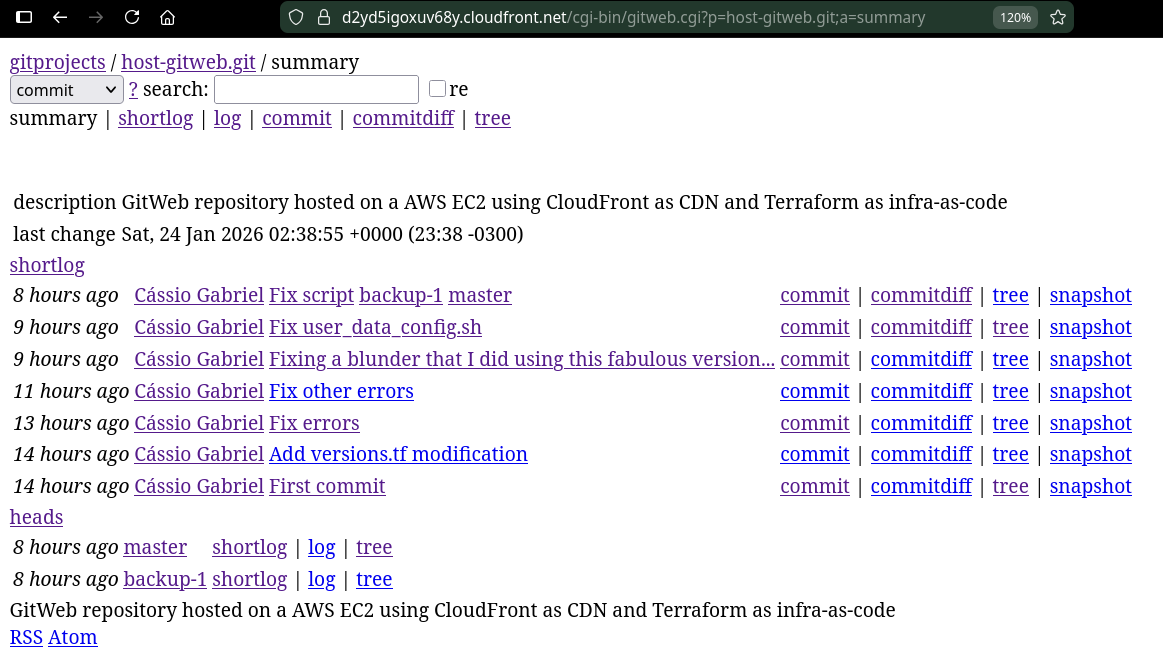
Production repository link –> here
Provisioning with Terraform #
Aiming to keep things as simple as possible, I decided to choose a straightforward configuration to provision the environment on AWS, without many assignments or configurations that are not useful for a simple Git repository.
Provisioned resources:
- AWS default VPC;
- Public subnet in a single AZ;
- Internet Gateway and explicit association in the route table;
- Security Group with minimal rules:
- SSH (22): allowed only from my public IP;
- HTTP (80): allowed only from the AWS managed prefix list for CloudFront origin-facing;
- EC2 instance t3.small, with Ubuntu 22.04;
user_data_config.shscript for automatic deployment of server configuration for the Git repository;
- Elastic IP to ensure origin stability;
- CloudFront distribution pointing to the instance’s public IP.
variables.tf:
variable "region" {
  type    = string
  default = "us-east-1"
}

variable "my_ip_cidr" {
  type        = string
  description = "Your public IP in CIDR format, e.g. 203.0.113.10/32"
}

variable "key_name" {
  type        = string
  description = "Existing EC2 Key Pair name in the target region"
}

variable "instance_type" {
  type    = string
  default = "t3.small"
}

variable "project_name" {
  type    = string
  default = "host-gitweb"
}
main.tf:
provider "aws" {
  region = var.region
}

# Default VPC
data "aws_vpc" "default" {
  default = true
}

# Default subnet in us-east-1a
resource "aws_default_subnet" "a" {
  availability_zone = "us-east-1a"
}

# Internet Gateway for default VPC
resource "aws_internet_gateway" "igw" {
  vpc_id = data.aws_vpc.default.id
}

# Public route table (0.0.0.0/0 -> IGW)
resource "aws_route_table" "public" {
  vpc_id = data.aws_vpc.default.id

  route {
    cidr_block = "0.0.0.0/0"
    gateway_id = aws_internet_gateway.igw.id
  }

  tags = {
    Name = "${var.project_name}-rt-public"
  }
}

# Associate route table to subnet
resource "aws_route_table_association" "a" {
  subnet_id      = aws_default_subnet.a.id
  route_table_id = aws_route_table.public.id
}

# Ubuntu AMI
data "aws_ami" "ubuntu" {
  most_recent = true
  owners      = ["099720109477"]

  filter {
    name   = "name"
    values = ["ubuntu/images/hvm-ssd/ubuntu-jammy-22.04-amd64-server-*"]
  }
}

# CloudFront origin-facing managed prefix list
data "aws_ec2_managed_prefix_list" "cloudfront_origin" {
  name = "com.amazonaws.global.cloudfront.origin-facing"
}

# Security Group
resource "aws_security_group" "gitweb" {
  name        = "${var.project_name}-sg"
  description = "SSH from my IP; HTTP only from CloudFront origin-facing"
  vpc_id      = data.aws_vpc.default.id

  ingress {
    description = "SSH only from my IP"
    from_port   = 22
    to_port     = 22
    protocol    = "tcp"
    cidr_blocks = [var.my_ip_cidr]
  }

  ingress {
    description     = "HTTP only from CloudFront origin-facing"
    from_port       = 80
    to_port         = 80
    protocol        = "tcp"
    prefix_list_ids = [data.aws_ec2_managed_prefix_list.cloudfront_origin.id]
  }

  egress {
    description = "Allow outbound"
    from_port   = 0
    to_port     = 0
    protocol    = "-1"
    cidr_blocks = ["0.0.0.0/0"]
  }
}

# EC2
resource "aws_instance" "gitweb" {
  ami                    = data.aws_ami.ubuntu.id
  instance_type          = var.instance_type
  subnet_id              = aws_default_subnet.a.id
  vpc_security_group_ids = [aws_security_group.gitweb.id]
  key_name               = var.key_name

  # Launch the script into the instance
  user_data = file("${path.module}/user_data_config.sh")

  tags = {
    Name = "${var.project_name}-ec2"
  }
}

# Elastic IP
resource "aws_eip" "gitweb" {
  domain   = "vpc"
  instance = aws_instance.gitweb.id

  tags = {
    Name = "${var.project_name}-eip"
  }
}

# CloudFront distribution
resource "aws_cloudfront_distribution" "gitweb" {
  enabled         = true
  is_ipv6_enabled = true
  comment         = "GitWeb behind CloudFront (origin restricted)"

  origin {
    domain_name = aws_eip.gitweb.public_dns
    origin_id   = "${var.project_name}-origin"

    custom_origin_config {
      http_port              = 80
      https_port             = 443
      origin_protocol_policy = "http-only"
      origin_ssl_protocols   = ["TLSv1.2"]
    }
  }

  default_cache_behavior {
    target_origin_id        = "${var.project_name}-origin"
    viewer_protocol_policy = "redirect-to-https"

    allowed_methods = ["GET", "HEAD"]
    cached_methods  = ["GET", "HEAD"]

    forwarded_values {
      query_string = true

      cookies {
        forward = "none"
      }
    }

    min_ttl     = 0
    default_ttl = 0
    max_ttl     = 60
  }

  restrictions {
    geo_restriction {
      restriction_type = "none"
    }
  }

  viewer_certificate {
    cloudfront_default_certificate = true
  }
}
The remaining configuration files can be found here.
Proceeding with applying the infrastructure:
$ terraform apply
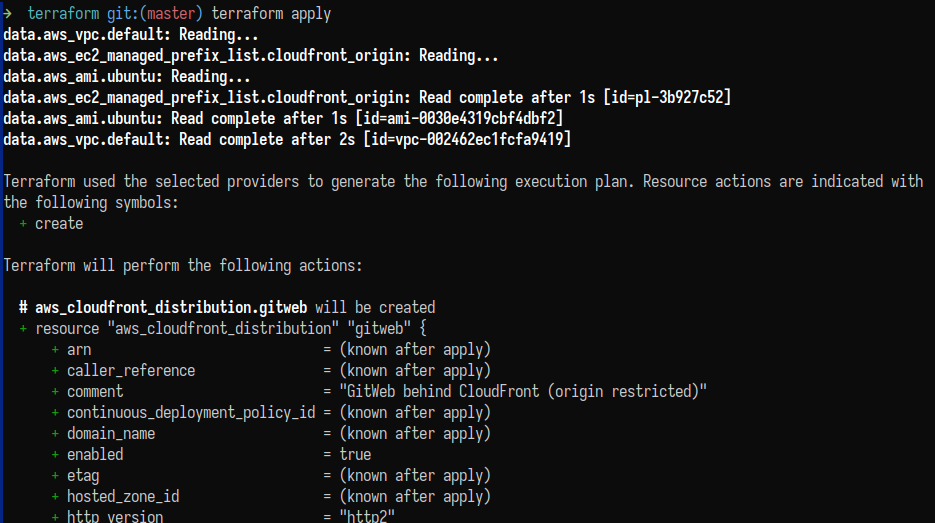
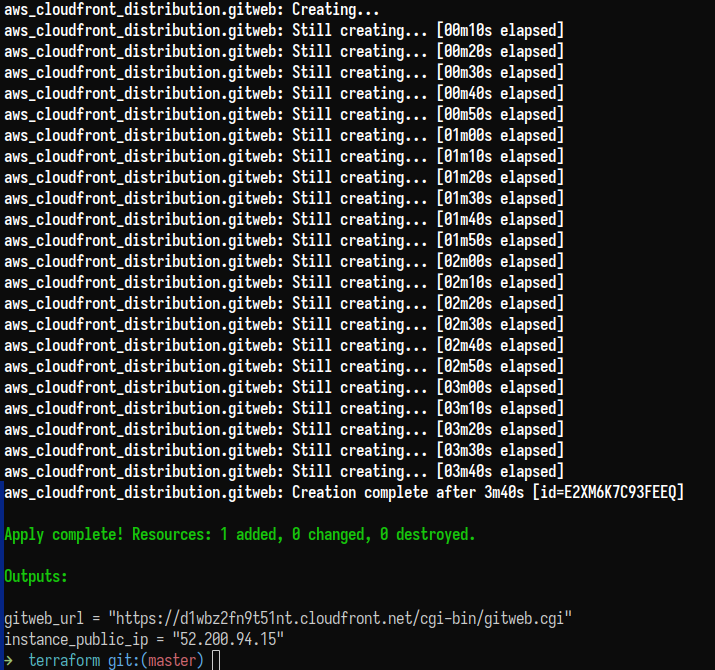
I had to destroy the infrastructure a few times to run some tests, so some screenshots show a different fixed Elastic IP.
With the infrastructure already established, let’s move on to the role of the user_data_config.sh script.
Server configuration via user_data_config.sh
#
The script in question:
#!/bin/bash
set -euo pipefail
export DEBIAN_FRONTEND=noninteractive

apt-get update
apt-get install -y git gitweb fcgiwrap nginx

# --- a dedicated 'git' user, git-shell only ---
if ! id git >/dev/null 2>&1; then
  useradd -m -d /home/git -s /usr/bin/git-shell git
fi

# Repo root /var/lib/git
mkdir -p /var/lib/git
chown -R git:git /var/lib/git
chmod 2750 /var/lib/git

# --- GitWeb config ---
cat >/etc/gitweb.conf <<'EOF'
$projectroot = "/var/lib/git";
$projects_list = $projectroot;
$site_name = "My Git Server (GitWeb)";
EOF

systemctl enable --now fcgiwrap

# --- Nginx serving GitWeb via fcgiwrap ---
cat >/etc/nginx/sites-available/gitweb <<'EOF'
server {
  listen 80;
  server_name _;

  add_header X-Content-Type-Options nosniff always;
  add_header X-Frame-Options SAMEORIGIN always;
  add_header Referrer-Policy no-referrer always;

  location = / { return 302 /cgi-bin/gitweb.cgi; }

  location /gitweb/static/ {
    alias /usr/share/gitweb/static/;
  }

  location /cgi-bin/gitweb.cgi {
    include fastcgi_params;
    fastcgi_param SCRIPT_FILENAME /usr/lib/cgi-bin/gitweb.cgi;
    fastcgi_param GITWEB_CONFIG /etc/gitweb.conf;
    fastcgi_pass unix:/run/fcgiwrap.socket;
  }
}
EOF

rm -f /etc/nginx/sites-enabled/default
ln -sf /etc/nginx/sites-available/gitweb /etc/nginx/sites-enabled/gitweb
nginx -t
systemctl enable --now nginx

# --- SSH hardening ---
sed -i 's/^#\?PasswordAuthentication .*/PasswordAuthentication no/' /etc/ssh/sshd_config

# Your requirement: allow root login (key-only)
sed -i 's/^#\?PermitRootLogin .*/PermitRootLogin yes/' /etc/ssh/sshd_config
systemctl restart ssh

# Convenience: allow same key used for ubuntu user to be used for git user
if [ -f /home/ubuntu/.ssh/authorized_keys ]; then
  install -d -m 700 -o git -g git /home/git/.ssh
  cat /home/ubuntu/.ssh/authorized_keys > /home/git/.ssh/authorized_keys
  chown git:git /home/git/.ssh/authorized_keys
  chmod 600 /home/git/.ssh/authorized_keys
fi
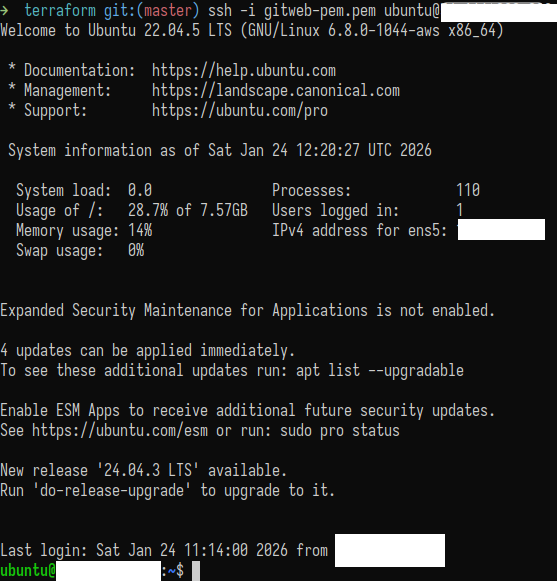
With the infrastructure provisioned, the next step was to ensure that the EC2 instance booted already configured to act as a Git server.
For this, I used a user_data_config.sh script, automatically executed on the instance’s first boot.
The idea was simple: bring the server up already ready, without the need for manual post-boot configuration.
Installing essential packages #
Right at the start of the script, I updated the repositories and installed only the required packages:
git: for repository management;gitweb: web visualization interface;nginx: HTTP server;fcgiwrap: allows Nginx to execute GitWeb’s CGI.
Nothing beyond what’s necessary, keeping the environment lightweight and easy to understand.
Creating the git user
#
Following common practice for Git servers, I created a dedicated user called git.
This user:
- has no interactive shell;
- uses
git-shellexclusively; - is responsible for hosting and managing repositories.
This ensures a clear separation between:
- system administration (ubuntu/root);
- Git operations (git).
Repository structure #
I defined /var/lib/git as the repository root directory.
This path:
- is simple;
- is easily referenced by GitWeb;
- simplifies permissions and organization.
All created repositories are bare, as expected for Git servers.
Configuring remote and local repositories #
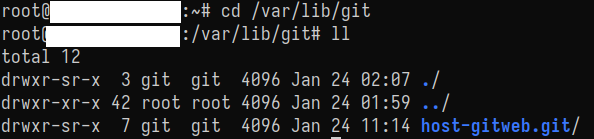
To initialize the “bare” (empty) Git repository, I had to run the following commands on the server to configure the remote environment:
$ sudo -u git git init --bare /var/lib/git/<projeto>.git
GitWeb configuration #
Next, I configured the /etc/gitweb.conf file pointing GitWeb to the correct repository directory.
The idea was to allow GitWeb to:
- automatically detect repositories;
- list all available projects;
- avoid relying on extra files or manual indexing.
This configuration was intentionally kept simple to avoid common errors and ease maintenance.
GitWeb + Nginx integration #
GitWeb works as a CGI.
To integrate it with Nginx, I used fcgiwrap.
I configured Nginx to:
- listen on port 80;
- redirect
/to GitWeb; - correctly serve GitWeb static files;
- execute
gitweb.cgivia FastCGI.
This approach removes the need for Apache and keeps the stack simpler.
Basic SSH hardening #
Since server access is done via SSH, I disabled password authentication, keeping only key-based authentication.
I also enabled root login via key, due to testing and direct administration needs, aware that this is not the most restrictive default, but acceptable within the project’s context.
Preparing Git access via SSH #
Finally, I ensured that the SSH key associated with the instance was automatically installed for the git user.
This solves an important point:
- administrative SSH access works with
ubuntu; git pushworks with thegituser;- both use the same key, with no additional manual configuration.
With this, any git push via SSH works immediately after provisioning.
Specific configuration in ~/.ssh/config
#
To make Git usage easier with the server, and also to logically separate my connection to this or other remote Git repositories, I configured the connection specifications for the remote repository discussed here in ~/.ssh/config:
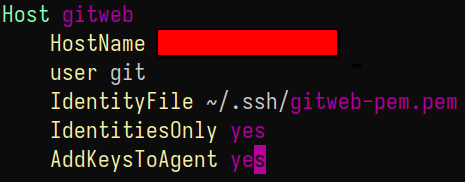
Then, I made the following changes to the local repository:
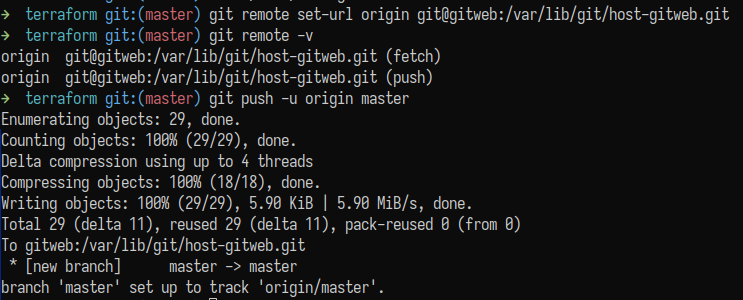
I added origin pointing to the remote repository, which receives/sends pull/push via SSH, authenticated by the git user key on the server.
All write control happens exclusively via SSH, using the git user.
Final result #
At the end of the instance boot:
- the server already accepts SSH connections;
- Git repositories can be created immediately;
- pushes via
git pushwork without additional adjustments; - GitWeb is already available and functional;
- the web interface is securely exposed via CloudFront;
- it is possible to add other infrastructure features later, such as ALB and automatic backups;
- it is also possible to configure another Git interface later, if needed.
The entire environment is born ready for use, reproducible, and controlled via Terraform.
This repository is also available here.